Game nights, actually planned
Stop asking
“who is on tonight?”
Gamer Nexus is your center for all things gaming. Schedule matches, find people to play with, and keep up with the news, across the platforms and games you already own. Your whole library in one place, single-player included.
Free to use. Premium is $2.99/month with a 7-day free trial.
What it does
Everything around the game
The game itself is the easy part. This is the scheduling, the chat, the library and the news that games stopped shipping with.
Schedule matches
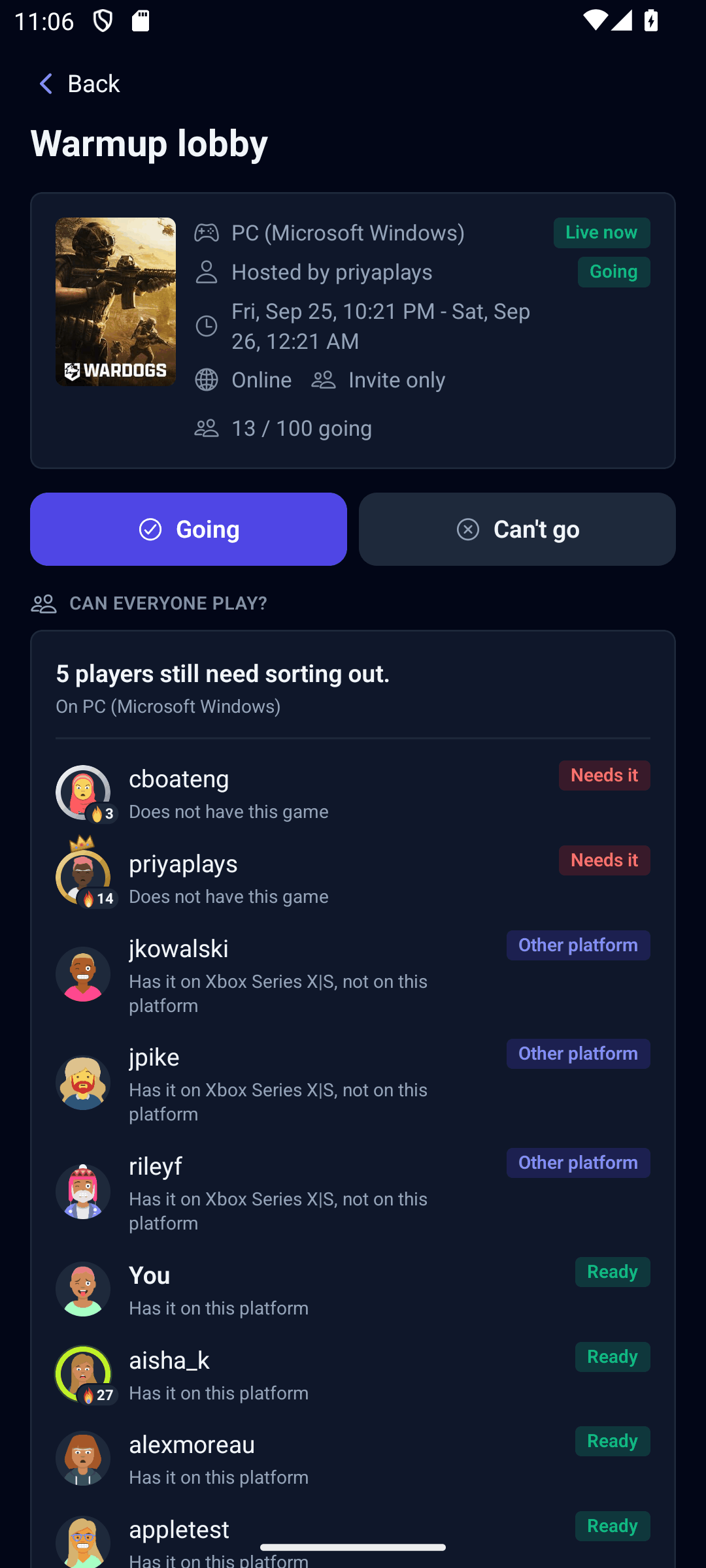
Pick a platform, a game and a time, then invite your friends or open it up to the wider community. Online or on one couch, with room for as many players as the game supports. Times show in the host's clock and in yours, so nobody does the maths.
Run tournaments
Single elimination or round robin, with brackets that advance themselves as results come in. The loser confirms the score, so nobody has to chase anyone. Creating one is Premium; playing in one, and following the tournaments your friends are in, is free.
Find your people
Post that you are looking to play, browse public matches, and search for players who own the same games on the same platforms. Blocking and reporting are built in, and the visibility of everything you post is yours to set.
One library, every platform
Sign in to Steam or Xbox with Premium and your library imports itself, playtime and achievements included, then stays current on its own. Every other platform takes a gamer tag you enter yourself.
Single-player counts
Not every game has a lobby. Keep your whole solo collection in one place: campaigns, the DLC you own, the editions and remasters, and the sequels you are still waiting on.
News, deals and your week
Headlines from IGN, Polygon, PC Gamer and more, tagged to the games in your library, alongside showcases, Steam sales, Game Pass arrivals and your own upcoming matches - one feed and one calendar.
Retro and cult classics
Built for games that never had a lobby
Four controllers around a Dreamcast. A late night with Goldeneye on the N64. The PS2 co-op campaign you never did finish. None of those shipped with matchmaking, a friends list or voice chat, and plenty of the games that did have since had their servers quietly switched off. The game still runs fine. It is everything around the game that went missing.
We keep supporting more platforms, new and old alike. If you are the one keeping a game alive, this is the part it never came with.
- Nobody turns up at 9pm by accidentWhen a game's playerbase is small and scattered across time zones, “who is on tonight?” stops working. Pick a time instead, invite the people who own it, and everyone sees it in their own clock.
- Bring your own chatA match can carry its own thread, so you can sort out teams, rules and house mods - none of which the game has to support.
- Couch co-op countsThis is not only for online games. Split-screen and LAN parties get a place and a time attached, the same as anything else.
How it works
From sign-up to game night
Seven screens, most of which you fill in once.
- 1Sign inUse your Google account, or Apple on an iPhone. There is no password to create or remember.
- 2Pick your platformsChoose the platforms you play on. You can change them whenever you like.
- 3Add your gamer tagsYour handle on each platform, so friends know where to add you. It is also the first thing people search by.
- 4Build your librarySearch for what you own, or link Steam or Xbox with Premium and have it imported for you.
- 5Find your friendsSearch by gamer tag, Steam persona or Xbox gamertag. All of that is free. By name or email too, if they have allowed it.
- 6Schedule a matchPick a game, a time and who is in. Each match can carry its own chat, RSVPs keep everyone on the same page, and Premium members can get a reminder before it starts.
- 7Stay in the loopYour home feed gathers gaming news, your scheduled matches, store sales and what your friends are up to.
Questions
Frequently asked
What is Gamer Nexus?
Gamer Nexus is the social hub for gaming with friends. It is not just a library tracker: it is where you plan matches and tournaments, chat about them, find people to play with, and keep up with the news for the games you own, across every platform you play on.
How do I schedule a game?
Pick a platform, a game and a time, then invite friends or open the match up to other players. Each match can have its own chat for sorting out teams, rules and who is bringing what, and every time is shown in both the host's timezone and yours.
Is Gamer Nexus free?
Yes. Building your library, scheduling matches with friends, group chat, playing in tournaments, tracking single-player games and your news feed are all free. Premium adds the Steam and Xbox integrations, creating tournaments, hosting public matches, match reminders, additional themes and higher limits.
What does Premium cost?
$2.99 a month or $24.99 a year, with a seven-day free trial and no obligation. It is billed through the App Store or Google Play, and you can cancel from there at any time.
Do I need Premium to play in a tournament?
No. Accepting an invite, playing your matches and reporting your results are free on any tier, with nothing to pay and nothing to unlock. Premium is only needed by the person who creates the bracket and invites everyone. Public matches split the same way: hosting one is Premium, joining one is free.
Does it work across different platforms?
Yes. You can add a gamer tag for every platform you own, and with Premium you can sign in to Steam or Xbox so your library, playtime and achievements import and stay current by themselves. We keep adding platform support over time, new hardware and old alike.
Can I chat with the people in a match?
Yes. A match can carry its own chat thread, and you can also message friends directly or in groups, so the coordination stays in one place instead of scattered across other apps.
Does it work for couch co-op, split-screen, or retro games?
Absolutely. Split-screen and LAN nights are where we really shine, with a time and a place attached, even for the games that never shipped with online lobbies, friends lists or voice chat.
How do I find people to play with?
Search by gamer tag, Steam persona or Xbox gamertag, all of which are free. You can also browse public matches other players have opened up, or post that you are looking to play so people can come to you. You choose how discoverable you are, and being findable by email is off unless you turn it on.
Can I see what my friends are playing?
With Premium, yes. Friends who have linked Steam or Xbox show up with what they are playing right now, and everyone controls whether their own activity is visible. There is an appear-offline switch too.
How do I sign up?
Sign in with your Google account, or with Apple on an iPhone or iPad. There is no separate password to create or remember. An email sign-in exists during the pre-release phase only.
Support
Questions, bugs or account help: email support@gamer-nexus.com and we will get back to you. Bug reports and ideas can also be sent straight from the app, under Profile › Feedback.
Deleting your account
Open the app and go to Settings › Delete account. Deletion is immediate and permanent. Full details, including what to do if you can no longer sign in, are on the account deletion page.